 |
SMS0010: Sends and receives SMS directly from pc usb - (pcApp) - Free! |
| PC USB power supply only. | |
| Hardware Data link: Amazon1 - | |
| Electrical note: (Recommendation:Use the following accessories for testing as well as for later use: Lnk1 - Lnk2 ) | |
| You can test the uploaded code using some free serial communication software such as Termite | |
| Description of program commands (for more abouth AT commands see: here - here - here ) | |
| AT command (ASCII characters) - 9600 Baud ,8 Data bits,None Parity,1 Stop Bit - for more see | |
| We use only some - most often | |
| AT - attention command (returns OK) | |
| ATI - software code info | |
| AT+CMGF=1 - set SMS text mode | |
| AT+CMGR=x - read the message from SIM Memory on location x (x=1,2,3....) | |
| AT+CMGD=x - delete the message from SIM Memory on location x (x=1,2,3....) | |
| AT+CMGS="yyyy" - Send the message. Set your To number (yyyy) | |
| example of sending a message: AT+CMGS="+381641234567" + ENTER + msg txt + wait 2s. + Send the CTRL+Z character. ^z | |
| PC Application(s): | |
| PC Application(s) (for WINDOWS): In order for the offered PC applications to work, it is necessary to download and install (only first time): VB6RunTimePlus2.2 | |
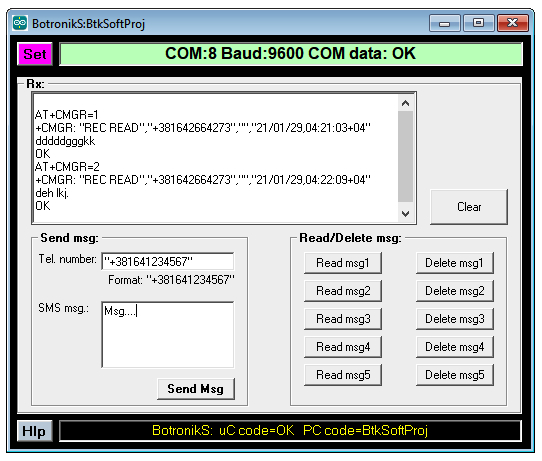
| Download the PC application, unpack and start (allow windows to start applications - how) enter the COM port number where the Arduino is connected and use that. | |
| PC App: SMS0010_pcApp1 | |
 |
|
