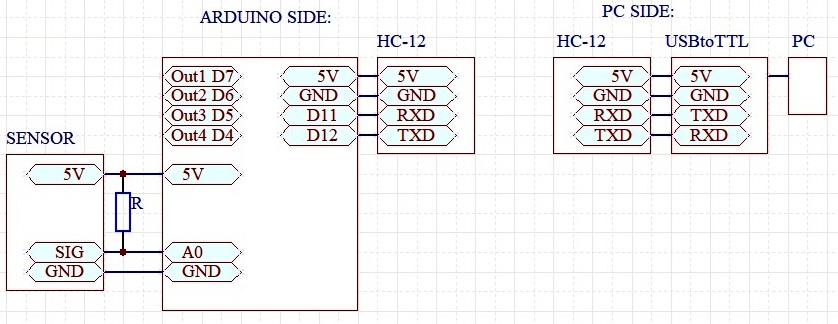
Shm:
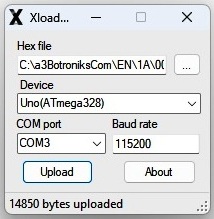
Xloader:
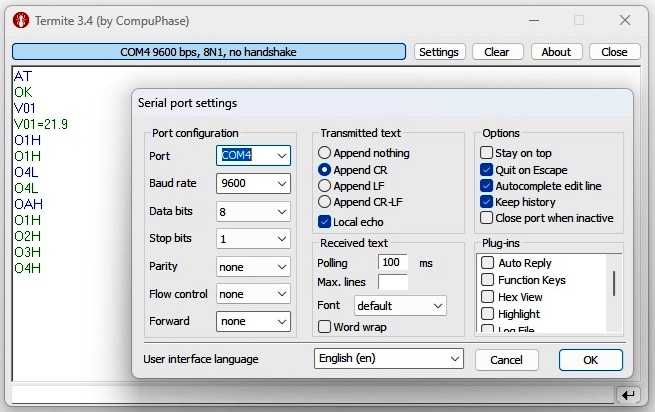
Termite-PC side:
| BotronikS - Final code for all types of Arduino and PC users: -- HOME -- email: botronik@gmail.com |
| What you need to install or have installed before on your PC: see HERE |
| RFC250415-4out1ds: RF (radio freq.) Status control of up to 4 outputs + Sensor DS18B20 from PC by Text commands... | ||||
|---|---|---|---|---|
Shm: |
Xloader: |
Termite-PC side: |
accessories: | |
| TB shield: 1 - 2 - 3 | ||||
| Reley shield: 1 - 2 - 3 | ||||
| HC-12 : 1 - 2 - 3 | ||||
| HC-12 data | ||||
| USBtoTTL: 1 - 2 - 3 | ||||
| Sensor: 1 - 2 - 3 | ||||
| Download the HEX codes below, unpack, and upload to the proper Arduino board (Use a free net tool for example XLoader) |
| 1. ATmega328-16MHz (NANO, UNO.....): |
| 2. AtMega2560 (Mega(MEGA2560).......): HexCode-m2560-ID1 |
| HexCode is Free! Ask for the price of the ArduinoIDE source code. |
| Based on the offered Text commands, you can develop your PC, PLC ... communication code, and applications... |
Available ID+TEXT commands: (ID=identifier) Test uploaded code using some free serial software such as Termite |
ID+AT - returns OK (eg. for ID=1 1AT) |
ID+OA - returns the status of all outputs |
| ID+Ox - returns status of single output x (x=1-4 H=5V L=0V) |
| ID+OxH - set single OUTx at HI(5V) level - example for ID=1: 1O1H |
| ID+OxL - set single OUTx at Lo(0V) level - example for ID=1: 1O1L |
| ID+OAH - set all outputs at a high (5V) level |
| ID+OAL - set all outputs at a low (0V) level |
| ID+V01 - returns value of sensor temperature (C) |
| Use loaded code for PC communications - Use and Try SScadas: SScade |